
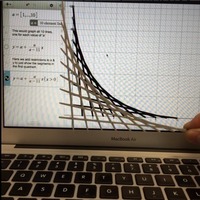


SummaryFalling Ladder design was created from a graph and converted to an STL.
Read the full details at
This thing is a 3D rendering of a 2D graph example in that is named Lists: Falling Ladder The purpose is to provide a model demonstrating the end product of the conversion of 2D graph in Desmos to a 3D model. As kitwallace points out in the comments, this would be an incorrect solution to a falling ladder problems as the lines are regular intervals. Please feel free to share a correct solution.
Update: New model with x & y axis added.
This thing was converted with Tinkercad. Edit it online I Designed ThisGraph to 3D PrintGraph to 3D Print
-Create graph at or use one of the provided examples
-Set graph color to black
–Graph Settings: Click Projector Mode
–Graph Settings: Turn off grid and axis
-Take a screenshot of the graph area
OR -Login to Desmos and save the image. Share Graph –> Image
-Convert image to SVG using Online-Convert
-Download SVG
-Import SVG into Tinkercad (Try 10% scale and 2mm height)
-Scale model and download STL
-3D PrintAdvanced - graph manipulationAdvanced – graph manipulation
-Import screenshot or graph image to Inkscape
-Path > Trace Bitmap
-Select graph and Edit Paths by Node
-Modify stroke style to create thicker lines for printing
Loading prints...
Falling Ladder via Desmos
0
likes
0
collections
Tags:

Creative Commons Attribution-ShareAlike
You can distribute, remix, adapt, and build upon the material in any medium or format, as long as attribution is given and your contributions are under the same license.
 Licensed under CC BY-SA



Loading comments...