


Summary
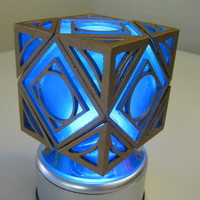
This is a replica of the unlocking Jedi Holocron as seen in Star Wars: The Clone Wars Animated. It can be changed back and forth between locked and unlocked configurations due to the magnets installed in the corners.
The prop consists of:
1 core
8 corners
6 Side pieces
8 Side piece Angle
Post-Printing
After printing I drilled bore holes in each of the corner pieces and the core piece corners, and superglued a small Rare Earth magnet in place.(Diagram in the last picture)
After paint with black paint, then cover in rub 'n buff or gold paint.
Cut acryllic panels to cover the inside of the core on all 14 sides. Leave a small lip on the acryllic to glue to the inside edge..
Rough up inside surface of the panels and spray with transparent blue tamiya spray paint. Then glue panels into place from the inside out.
Glue external panels to the sides and angle sides then attach the corners in place, they will be held by the magnets.
Alternatively, you can glue the corners in place in the desired position, locked or unlocked instead of installing the magnets.
Loading prints...
Unlocking Jedi Holocron
16
likes
7
collections
Tags:
Creative Commons Attribution-ShareAlike
You can distribute, remix, adapt, and build upon the material in any medium or format, as long as attribution is given and your contributions are under the same license.
 Licensed under CC BY-SA


Loading comments...