


Summary
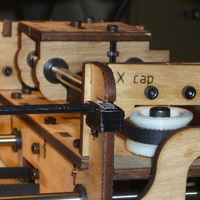
Inspired by the Z axis endstop trigger that Zaggo published, here are a set for the other axes. Also, the Sketchup files are included, so it is easy to modify the length of the stick to customize for your machine.
Instructions
Modify the length of the stick as needed, using Sketchup. Use the sketchup plug-in to output to stl format, skeinforge to get gcode, print it.
This fits over any of the laser cut wood frames that are used in the X and Y stages. Align it with the optical endstop opening, use hot glue to attach it and you are set.
For the minus Z axis, the stick is made short by about 1 mm compared to where the extruder hits the build plate, so it does not give false triggers. To get it perfect, put some black electrical tape on the end, so that it triggers exactly when the extruder is at the build plate. In that way you can use the stop to provide precise positioning of the extruder over the plate-- just run down to the stop and then back up by the distance you want to extrude from.
Loading prints...
Endstop Trigger, any axis
0
likes
0
collections
Tags:
Creative Commons Attribution
You can distribute, remix, adapt, and build upon the material in any medium or format, as long as attribution is given to the creator.
 Licensed under CC BY


Loading comments...