


Summary
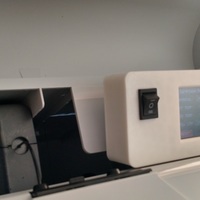
I further developed the available online code to allow easy programming of the eeprom from a cartridge via a touchscreen. The touchscreen shield was purchased from eBay which had the SPFD5408 chip. I've included the arduino code and needed libraries.
You will need:
Arduino Uno
Touchscreen 2.4 shield with SPFD5408 chip
Spare Eeprom chip from cartridge
DPDT switch like the one pictured
Wire and Soldering iron etc.
How I installed it:
I removed the back panel and took 5v supply (pos and neg) and feed the cables to where the programmer was going to be installed and wired to power the arduino ( wired the neg through the DPDT switch so the arduino is only powered then the eeprom is connected to the arduino). I then carefully soldered 3 wires to the place where the eeprom cartridge is read (Pos / Signal / Neg). The pos and neg was soldered directly to the spare eeprom which is housed with the touchscreen. The signal is soldered to the DPDT switch. Pin 4 on the arduino is then also wired to the DPDT switch and finally the centre position of the DPDT switch is soldered to the eeprom. This then allows the DPDT switch to toggle the eeprom to Connected / Off / Arduino.
Loading prints...
Da Vinci 1.1 Cartridge Touch screen programmer
0
likes
0
collections
Tags:
Creative Commons Attribution-ShareAlike
You can distribute, remix, adapt, and build upon the material in any medium or format, as long as attribution is given and your contributions are under the same license.
 Licensed under CC BY-SA


Loading comments...