


Summary
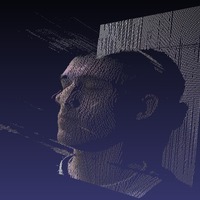
This is my face. We used the 3d scanner described here: http://www.thingiverse.com/thing:1491 and here: http://abarry.org/stereo to scan and then print the face.
Update -- just printed a new version upside down for much better print resolution!
Instructions
Scan face into pointcloud.
Use Blender 3D to clean the pointcloud (import PLY, export as OBJ)
Open the cleaned pointcloud in Meshlab and:
a. Compute normals by Filters > Normals, Curvatures and Orientation > Compute normals for point sets. I used the default settings here.
b. Then compute a surface using Filters > Point Set > Poisson Reconstruction. For this, use an Octree Depth of 11 but all the other settings as the defaults. This will take 15-30 seconds to compute.
Once you've got the meshed face, save it as an STL and import it back into Blender. In Blender, add a block to the back of it and export it as an STL.
Skeinforge!
Print!
Loading prints...
Andy's Face
0
likes
0
collections
Tags:
Creative Commons Attribution-NonCommercial-ShareAlike
You can distribute, remix, adapt, and build upon the material in any medium or format for noncommercial purposes only, with attribution and under the same license.
 Licensed under CC BY-NC-SA
Files Included
1 downloadable file:
Free download - login required
Downloaded: 25 times
Downloaded: 25 times


Loading comments...